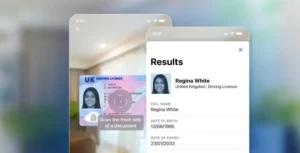

Document Capture
Document capture is the step that turns a physical identity document into images a verification system can analyze. It sounds trivial and is where most remote verification flows actually fail — not because the analysis is wrong, but because the image never contained enough information to analyze.
| What it produces | One or more images, increasingly a short video or frame sequence |
| Capture modes | Camera in-app, file upload, dedicated scanner, NFC chip read alongside |
| Quality factors | Focus, resolution, glare, motion blur, framing, color accuracy, lighting |
| Common failure | Glare across a laminate obscuring the portrait or the MRZ |
| Auto-capture | Detects edges, focus and stability, then triggers without a button press |
| Why video matters | Optically variable features only reveal themselves across changing angles |
| Upload risk | A file upload can be any image, including one never taken by that device |
| Accessibility | Steady-hand and prompt-following requirements exclude some users |
How it works
Good capture is an interaction problem before it is an imaging one. The system has to get an untrained user, holding an unfamiliar document, in whatever lighting they happen to be in, to produce an image good enough for forensic analysis — on the first or second attempt, because a third usually means abandonment.
Auto-capture is how that gets solved. Rather than asking the user to judge when the image is right, the system watches the camera stream, detects the document’s edges, assesses focus and stability, and fires the shutter itself when the frame is good. Removing the shutter decision from the user removes the commonest cause of unusable images.
Guidance handles the rest — real-time prompts to move closer, reduce glare, or hold steady. The design constraint is that instructions have to be understood by someone not paying close attention, which is why the effective ones are short and positional rather than technical.
Frame sequences matter more than they once did. A single flat photograph cannot reveal an optically variable ink or a hologram, because those features exist precisely in how they change across viewing angles. Capturing several frames as the document moves gives the analysis something a still image structurally cannot contain — and it makes replaying a photograph of a photograph much harder.
Why it matters for identity verification
Every downstream check inherits the capture’s limits. Document authentication cannot assess a security feature that glare obscured. MRZ parsing fails on text too blurred to resolve. Face matching degrades when the portrait is low-resolution. The most sophisticated analysis in the world cannot recover information the image never held.
This is why capture quality shows up in conversion numbers rather than accuracy numbers. A flow with excellent authentication and poor capture guidance produces high rejection rates on genuine documents, and users experience that as the product being broken. They abandon, and the abandonment is recorded as a funnel problem rather than a verification one.
Capture is also a security surface in its own right. A file upload accepts any image from anywhere, including one lifted from a data breach. Camera-only capture with device attestation narrows that, and frame sequences make replay harder. Injection attacks target this layer specifically — feeding synthetic frames into the pipeline as though they came from the camera — which is why attesting the capture channel matters alongside analyzing the document.
Camera capture vs file upload
| In-app camera capture | File upload | |
|---|---|---|
| Image provenance | Known — taken now, on this device | Unknown — any image from anywhere |
| Quality control | Auto-capture and live guidance | None — whatever the user has |
| Frame sequences | Possible | Not possible |
| Replay resistance | Higher, especially with attestation | Very low |
| Accessibility | Requires steady hands and prompt-following | More forgiving for some users |
| Typical use | Consumer onboarding | Back-office review, accessibility fallback |
Upload is worth keeping as a fallback for users who cannot complete camera capture, but it should be treated as a lower-assurance path rather than an equivalent one.
What it can’t do
It cannot fix a document that is truly worn. A laminate scuffed opaque, a portrait rubbed away, a card cracked through the chip — no capture technique recovers what is physically gone. Some rejections are correct and simply need a graceful path to manual review.
It cannot fully replace physical inspection. Substrate feel, the way a laminate resists a fingernail, the exact behavior of an optically variable ink at a shallow angle — a camera at arm’s length captures some of this and not all of it.
It cannot confirm the document was physically present. A high-quality capture of a high-quality printed copy is a high-quality capture. Distinguishing a real document from a good reproduction is document liveness, a separate check.
Better capture will not fix an over-tight threshold. If genuine documents are being rejected, the cause is often policy rather than image quality. Improving capture on a flow whose thresholds are miscalibrated moves the rejections around without reducing them.
Frequently asked questions
Why does document capture fail so often?
Usually glare, focus, or framing rather than anything about the document. Laminates reflect, phone cameras hunt for focus on low-contrast surfaces, and users crop the edges. Auto-capture and live guidance address most of it.
Is a photo upload as good as taking a picture in the app?
No. An upload can be any image from any source, so its provenance is unknown and replay resistance is very low. In-app capture knows the image was taken now, on this device, and can capture multiple frames.
Why do some verification flows ask me to tilt my ID?
To capture optically variable features — holograms and color-shifting inks that only reveal themselves as the viewing angle changes. A single flat photograph cannot contain them, and a printed copy will not reproduce them.
Does document capture work in low light?
Up to a point. Modern phone sensors cope with dim conditions, but low light means longer exposures and more motion blur, and flash usually makes glare worse on laminated documents. Even, indirect light produces the best results.
Related reading
- Machine-readable zone — the element capture most needs to resolve cleanly
- Optical character recognition — what turns the captured image into data
- Document liveness detection — confirming the document was physically present
- ID scanner apps and compliance — how capture quality plays out in production