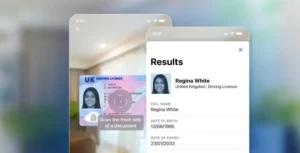

Image Capture Application
An image capture application is software that acquires images from a camera for a downstream purpose — not simply taking a photograph, but producing an image fit for something specific. In identity verification that purpose is forensic analysis, and it sets requirements a general camera app never has to meet.
| General definition | Software that acquires images from a camera or scanner for a defined purpose |
| In identity verification | Capturing a document or face to a standard that supports authentication |
| Consumer camera goal | A pleasing image |
| Verification capture goal | An analyzable image — sharp, complete, unprocessed |
| Key mechanism | Auto-capture — the software decides when the frame is good, not the user |
| Quality checks | Focus, glare, edge detection, resolution, motion, framing |
| Why frame sequences matter | Optically variable features only appear across changing angles |
| Why processing hurts | Beautification, sharpening and heavy compression destroy forensic detail |
| Where it sits | Between the user and every check that follows |
How it works
The counter-intuitive part is that a good verification capture app wants a worse-looking photograph than a camera app does.
Consumer cameras apply processing to make images attractive: sharpening, noise reduction, tone mapping, and on many phones a degree of facial smoothing. Every one of those destroys the fine detail that document authentication relies on. Microprint that a sensor resolved becomes a smear after noise reduction. Skin texture that would have proved a live face is smoothed away. A capture application built for verification suppresses that processing and keeps the image closer to what the sensor actually recorded.
Auto-capture is the other defining feature. Rather than asking a user to judge when the image is right, the software watches the camera stream continuously, detects the document’s edges, evaluates focus and stability, and fires the shutter itself. Taking the shutter decision away from the user removes the single largest source of unusable submissions.
Real-time guidance handles the rest — move closer, reduce glare, hold steady — and the constraint is that instructions must be understood by someone not reading carefully.
Frame sequences matter increasingly. A hologram or optically variable ink exists in how it changes across viewing angles, so a single flat image cannot contain it. Capturing several frames as the document moves gives the analysis something a still photograph structurally lacks, and makes replaying a picture of a picture much harder.
Why it matters for identity verification
Capture is the step every other check inherits from, and its failures are silent.
Document authentication cannot assess a security feature that glare obscured. MRZ parsing fails on text too blurred to resolve. Face matching degrades on a low-resolution portrait. None of these report “the image was inadequate” — they report a lower confidence score, which looks like a risk signal and is actually a capture problem.
That is why capture quality shows up in conversion figures rather than accuracy figures. A flow with excellent analysis and poor capture produces high rejection on genuine documents, users experience it as broken, and the abandonment gets recorded as a funnel issue rather than a verification one.
Capture is also a security surface. A file upload accepts any image from any source, including one lifted from a breach. Camera-only capture with device attestation narrows that considerably, and injection attacks target this layer specifically by feeding synthetic frames in as though they came from the camera. Analyzing the document and controlling how its image was obtained are separate problems, and both have to be solved.
Consumer camera app vs verification capture
| Consumer camera app | Verification capture | |
|---|---|---|
| Goal | A pleasing image | An analyzable image |
| Processing | Sharpening, noise reduction, smoothing | Suppressed — keeps sensor detail |
| Shutter decision | The user | Auto-capture, on quality thresholds |
| Guidance | None | Real-time, positional |
| Output | A single compressed file | Frames, often several, minimally compressed |
| Provenance | Unknown once saved | Known — captured now, on this device |
What it can’t do
It cannot recover detail the sensor never resolved. Poor lighting, a dirty lens, a worn document — no processing reconstructs information that was not captured. Some rejections are correct and need a path to manual review rather than a better algorithm.
It cannot fully replace physical inspection. Substrate feel, how a laminate resists a fingernail, the behavior of an optically variable ink at a shallow angle — a camera at arm’s length gets some of this and not all.
It cannot confirm the document was physically present. A high-quality capture of a high-quality reproduction is a high-quality capture. Distinguishing the two is document liveness, a separate check.
It cannot compensate for a miscalibrated threshold. Where genuine documents are being rejected, the cause is often policy rather than image quality, and better capture moves those rejections around without reducing them.
Frequently asked questions
Why can’t I just upload a photo of my ID?
You often can, and it is a lower-assurance path. An upload can be any image from any source, so its provenance is unknown and replay resistance is very low. In-app capture knows the image was taken now, on this device, and can collect multiple frames.
Why does verification capture look worse than my camera roll?
Because it is meant to. Consumer processing — sharpening, noise reduction, facial smoothing — destroys the fine detail document authentication depends on. Verification capture suppresses it to keep the image closer to what the sensor recorded.
What is auto-capture?
The software monitors the camera stream, detects the document’s edges, checks focus and stability, and takes the picture itself when the frame is good. Removing the shutter decision from the user eliminates the most common cause of unusable images.
Why do some apps ask me to tilt my document?
To capture optically variable features — holograms and color-shifting inks that only reveal themselves as the angle changes. A single flat image cannot contain them, and a printed copy will not reproduce them.
Related reading
- Document capture — the wider process this application performs
- Optical character recognition — what turns the captured image into data
- Machine-readable zone — the element capture most needs to resolve
- Liveness detection — the equivalent question asked of a face