
Best Facial Recognition Software 2026

Intro Section
As we move into 2026, facial recognition technology has become a core control for digital identity, fraud prevention, and regulatory compliance. For fraud decision-makers, the question is no longer whether to use facial biometrics, but which platform can deliver the right mix of liveness detection, matching accuracy, deployment flexibility, and customer experience.
That distinction matters because not all facial recognition software serves the same purpose. Some tools are optimized for 1:1 identity verification during onboarding, others are built for access control or cloud-scale image analysis, and some focus narrowly on liveness and deepfake defense.
This guide evaluates five leading vendors through the lens that matters most to compliance officers, risk leaders, heads of security, and CFOs: fraud reduction, operational fit, implementation demands, and support for secure, auditable identity workflows.
Table with Competitors
| Company | Compliance Features | Industry Focus | AI Capabilities | User Experience | Developer Experience |
|---|---|---|---|---|---|
| Microblink | Strong support for KYC and AML onboarding through document verification, selfie matching, liveness checks, and audit-friendly workflows. | Best aligned with fintech, banking, and other regulated digital onboarding environments. | Combines document OCR, 1:1 facial matching, passive liveness, and spoof detection for fast identity verification. | Excellent overall experience thanks to passive liveness that reduces prompts and lowers abandonment during sign-up. | Well-optimized SDKs for iOS, Android, and web make implementation practical, though it still requires dedicated engineering effort. |
| Paravision | Useful for regulated identity and public-sector programs, but compliance workflows usually need to be built around its core biometric engine. | Strong fit for enterprise security, government identity programs, access control, and OEM biometric solutions. | NIST-leading face recognition, deepfake detection, and strong performance across demographics and difficult conditions. | High-performance matching enables fast authentication, but the end-user experience depends on the interface the customer builds. | Highly flexible APIs support cloud, on-prem, and edge deployment, though the platform is best suited to experienced technical teams. |
| Amazon Rekognition | Provides liveness and identity analysis features, but customers are responsible for managing governance, privacy, and policy requirements in AWS. | Best for AWS-centric enterprises, large-scale digital services, analytics use cases, and cloud-based authentication flows. | Offers scalable image and video analysis, facial comparison, liveness detection, and custom labeling beyond biometrics. | Reliable for cloud-native applications, though latency and connectivity can affect experience in low-bandwidth environments. | Very strong for teams already using AWS, with straightforward API access and native integrations across the Amazon stack. |
| Veriff | Comprehensive compliance coverage with automated KYC workflows, document validation, biometric checks, and strong support for auditability. | Especially well suited to fintech, crypto, online marketplaces, and age-restricted digital services. | Uses a video-first approach with document analysis and biometric fraud detection to improve assurance during onboarding. | Guided flows work well across devices, but the added video step can create more friction than lighter-weight selfie-based tools. | Offers a more complete out-of-the-box verification platform than core API vendors, which reduces build time for compliance teams. |
| Oz Liveness | Strong for organizations with strict biometric security and privacy requirements, especially where on-device or on-prem processing supports compliance goals. | Focused on fraud prevention, secure authentication, and high-security environments where spoof resistance is critical. | Specializes in presentation attack detection, deepfake defense, and advanced liveness analysis rather than full facial matching. | Fast passive checks support a smooth login or step-up authentication experience, although customization of the capture interface is more limited. | Lightweight SDKs make it easy to add liveness into existing stacks, but a separate matching engine is needed for a full identity solution. |
1. Microblink
Platform Summary
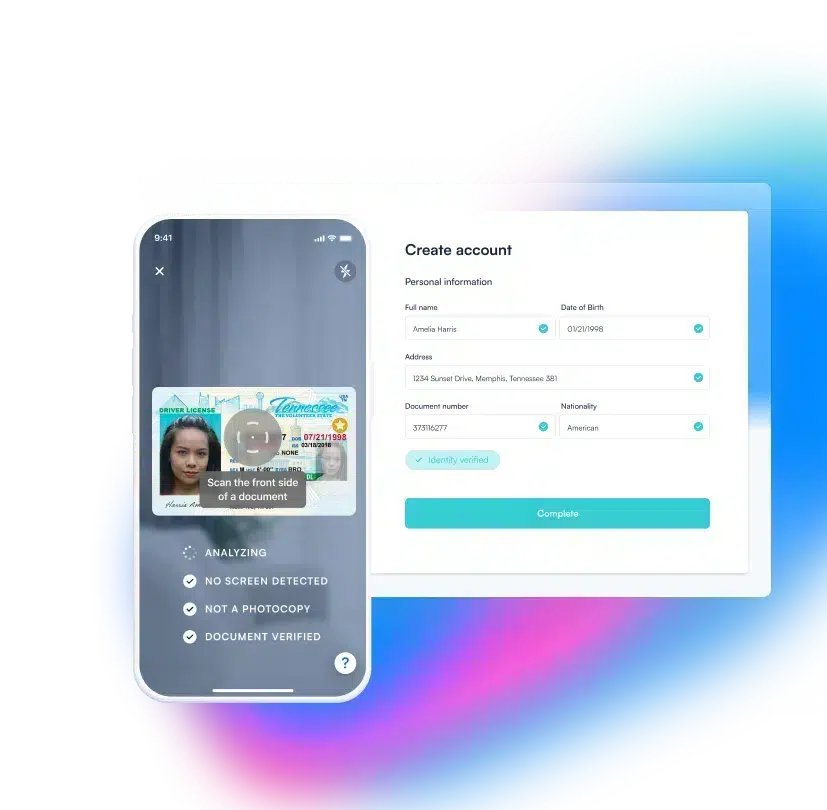
Microblink is a biometric authentication and identity verification platform built for regulated enterprises that need strong fraud controls without creating unnecessary onboarding friction. Its core value for fraud decision-makers is the combination of passive liveness, face-to-document matching, deepfake and injection attack resistance, and privacy-conscious deployment options that support secure digital onboarding at scale.
Microblink is especially well suited to banks, fintechs, insurers, marketplaces, and other organizations that need to verify a real person against a real identity document while maintaining auditability and customer conversion.
Key Benefits
- Frictionless verification flow: Microblink uses passive liveness rather than challenge-based prompts, so users can complete verification with a simple selfie capture. That helps reduce abandonment during onboarding and lowers operational drag caused by failed verification attempts.
- Stronger defense against modern fraud: The platform is built to address not just printed-photo spoofs, but also synthetic media, deepfakes, and injection attacks. This is increasingly important as fraudsters shift from physical presentation attacks to camera-bypass techniques.
- Better privacy and compliance alignment: On-device processing and zero-data-access models can help enterprises reduce exposure around sensitive biometric data. For teams managing GDPR, data residency, and internal privacy requirements, that architectural flexibility matters.
- Enterprise-ready scale: Microblink processes identities across more than 195 countries and territories and supports large-volume onboarding programs. That makes it a strong fit for enterprises that need consistent verification standards across multiple markets.
Core Features
- Passive liveness detection: Microblink verifies that a real, live person is present without requiring head turns, blinking prompts, or other active steps.
- Injection attack and deepfake prevention: Its models are trained to detect synthetic video and virtual camera attacks that can bypass legacy selfie checks.
- Face-to-document cross-matching: The platform matches the live user’s selfie against the portrait on a verified identity document to confirm true ownership.
- On-device processing and privacy controls: Organizations can keep biometric processing closer to the endpoint to support stricter privacy and security requirements.
Primary Use Cases
- Enterprise customer onboarding: Microblink helps organizations bind a new account to a verified person at the moment of account creation, supporting KYC and AML obligations.
- Step-up authentication for high-risk actions: Teams can trigger a biometric check for large payouts, account changes, or other risky events without adding friction to every session.
- Account recovery and device changes: The platform can re-establish identity quickly when a user loses credentials or logs in from an unfamiliar device.
- Periodic re-verification: Enterprises can re-confirm that a returning or higher-risk user still matches the identity originally enrolled.
Recent Updates
- DHS RIVR performance: Microblink was the only system reported to meet every performance threshold in the U.S. Department of Homeland Security’s RIVR evaluation, with a 0.00% system error rate.
- IDNet deepfake detection: The platform achieved 100% deepfake detection on the DHS-backed IDNet benchmark.
- Industry recognition: Microblink received a World AI Cannes Festival Excellence Award for deepfake detection.
- Expanded enterprise scale: As of 2025, Microblink reported processing over 2.9 billion identities globally.
Limitations
- Premium pricing model: Microblink’s enterprise-grade stack may be more than very small businesses need. The strongest ROI tends to appear when verification volume, fraud pressure, and compliance demands are already meaningful.
- Implementation still requires technical resources: The SDKs and APIs are mature, but deployment is not entirely plug-and-play. Organizations without internal engineering support may need outside help to move from proof of concept to production.
- Purpose-built for identity verification, not surveillance: Microblink is optimized for 1:1 onboarding, authentication, and re-verification flows. Teams looking for public-space watchlist matching or broad 1:N surveillance use cases will need a different category of vendor.
2. Paravision
Platform Summary
Paravision is an enterprise facial recognition provider known for high benchmark performance, demographic fairness, and flexible deployment. It is best suited to organizations that want a strong biometric engine and have the technical capacity to build workflows, interfaces, and controls around it.
For fraud and compliance leaders, Paravision is most compelling when accuracy, deployment control, and customized biometric architecture matter more than out-of-the-box onboarding simplicity.
Core Features
- Top-tier NIST accuracy: Paravision consistently performs well in facial recognition benchmarks, including demanding 1:1 and 1:N environments.
- Deepfake and presentation attack detection: The platform includes liveness and anti-spoofing capabilities to support secure authentication.
- Modular APIs: Enterprises can deploy the technology in cloud, on-prem, or edge settings depending on governance and architecture requirements.
- Demographic fairness focus: Paravision emphasizes bias reduction and more consistent performance across populations.
Primary Use Cases
- Access control: Commonly used in enterprise physical security and secure facility entry.
- Remote onboarding: Can serve as the face-matching layer inside regulated ID verification workflows.
- Government identity programs: Well aligned with border, public-sector, and digital identity initiatives that demand high accuracy.
Recent Updates
- NIST performance: In 2025, Paravision achieved top 5 global rankings in both 1:1 and 1:N matching in the latest NIST FRTE evaluations.
Limitations
- Core engine rather than full workflow platform: Paravision provides strong biometric technology, but most teams will still need to build the surrounding experience. That means compliance workflows, UI, and operational tooling often need to come from internal teams or partners.
- Steeper learning curve for non-technical buyers: The platform is designed with developers and enterprise architects in mind. Organizations without experienced biometric or API teams may face a slower path to deployment.
- Best fit for large-scale or security-intensive use cases: Smaller firms looking for a turnkey onboarding widget may find it too complex. It makes more sense when technical flexibility and matching performance outweigh ease of setup.
3. Amazon Rekognition
Platform Summary
Amazon Rekognition is a cloud-based image and video analysis service within AWS that includes facial analysis, facial comparison, and liveness capabilities. It is a logical choice for enterprises already standardized on AWS and looking to add biometrics within a broader cloud-native architecture.
For fraud decision-makers, its main strengths are scalability, integration with the AWS ecosystem, and flexibility across high-volume digital services. Its main tradeoff is that governance, privacy controls, and cost management remain the customer’s responsibility.
Core Features
- Highly scalable cloud API: Rekognition can support large image and video workloads across global applications.
- Face liveness detection: The platform includes checks to help confirm physical presence and reduce spoofing.
- Custom labeling: Teams can train models for non-biometric image analysis use cases alongside facial recognition.
- Content moderation capabilities: Useful for platforms that also need image and video safety controls.
Primary Use Cases
- Enterprise identity verification: Supports selfie-to-ID comparison workflows during onboarding.
- Retail analytics: Used for image and video analysis beyond fraud, including traffic and demographic insights.
- Multi-factor authentication: Can act as a biometric layer for higher-risk events and account actions.
Recent Updates
- Enhanced face liveness: Amazon recently improved its Face Liveness models to strengthen spoof detection and reduce latency.
Limitations
- Cloud-only deployment: Rekognition depends on AWS connectivity and is not designed for fully offline or air-gapped environments. That can be a blocker for organizations with strict edge-processing, data control, or low-latency local requirements.
- Variable and sometimes complex pricing: Usage-based pricing offers flexibility, but monthly costs can shift quickly when traffic grows. Finance and operations teams need disciplined monitoring to avoid unpleasant budget surprises.
- Higher privacy and governance burden on the customer: Because Amazon operates at enormous scale, facial recognition deployments may attract extra stakeholder scrutiny. Organizations need strong internal governance, documentation, and policy oversight to use it responsibly.
4. Veriff
Platform Summary
Veriff is a full-service identity verification platform that combines document checks, biometrics, and automated review workflows. Its video-first approach gives it a strong position in regulated onboarding environments where organizations want a more complete KYC stack rather than a standalone facial matching engine.
For compliance teams, Veriff’s appeal lies in faster deployment, global document support, and broad workflow coverage. The tradeoff is that its richer capture process can introduce more friction and higher verification costs than lighter selfie-first alternatives.
Core Features
- Automated KYC workflows: Veriff combines biometric matching and document validation in a guided verification flow.
- Video-first verification: The platform captures richer session data than static-image systems, which can improve assurance.
- Cross-device support: Works across mobile and desktop environments with adaptive user flows.
- Global document coverage: Recognizes and validates a wide range of identity documents across markets.
Primary Use Cases
- Fintech onboarding: Strong fit for banks, neobanks, and crypto platforms managing regulated customer acquisition.
- Age verification: Useful for sectors with minimum-age requirements and regulated access rules.
- Trust and safety: Helps marketplaces and digital platforms verify both sides of a transaction or interaction.
Recent Updates
- Faster automated decisions: Veriff recently upgraded its biometric algorithms to reduce user wait times and improve automated verification speed.
Limitations
- Heavier workflow for everyday authentication: Veriff is optimized for high-assurance onboarding rather than lightweight daily login checks. In lower-risk use cases, the extra verification depth may create unnecessary friction.
- Bandwidth dependence: Because the platform relies on video capture, weak connections can hurt completion rates. This is particularly important for businesses serving customers in lower-bandwidth regions or on older devices.
- Pricing favors scale: Veriff can be cost-effective for high-volume enterprise onboarding, but smaller programs may see a higher effective cost per verification. Buyers should compare the added assurance value against both conversion and budget goals.
5. Oz Liveness
Platform Summary
Oz Liveness is a specialized biometric security product focused on presentation attack detection, deepfake defense, and liveness verification. Rather than positioning itself as a full ID verification suite, it works best as a dedicated anti-spoofing layer inside a larger identity or authentication stack.
For security and compliance leaders, Oz Liveness stands out when deepfake resilience, on-device processing, and privacy-sensitive deployment options are the top priorities.
Core Features
- Advanced biometric attack prevention: Designed to detect masks, deepfakes, and other sophisticated spoof attempts.
- On-device processing: Supports biometric checks without sending all face data to the cloud.
- Flexible SDK integration: Can be embedded into existing verification or authentication flows.
- Independent PAD validation: The platform highlights strong performance in ISO 30107-3 testing.
Primary Use Cases
- Preventing deepfake-based fraud: Useful in high-risk financial and authentication scenarios where synthetic media is a serious concern.
- Secure authentication: Works well for login protection and step-up verification during sensitive actions.
- Compliance risk reduction: Supports teams that need stronger biometric controls under strict privacy or security standards.
Recent Updates
- iBeta testing result: Oz Liveness recently reported 100% accuracy in ISO 30107-3 presentation attack detection testing by iBeta.
Limitations
- Not a full identity verification suite: Oz Liveness is highly specialized in liveness rather than end-to-end onboarding. Most organizations will still need separate document verification and face-matching components.
- Limited standalone value for onboarding teams: By itself, the product cannot complete a full KYC flow. Its strongest value appears when an organization already has an identity stack and wants to harden it against sophisticated spoofing.
- More constrained capture customization: The SDK is relatively easy to integrate, but the capture experience may offer less design flexibility than broader platform vendors. Brands with strict UX or white-label requirements may need to compromise on presentation.
What is facial recognition software?
Facial recognition software is an advanced biometric technology that maps and analyzes an individual’s unique facial features to verify their identity. By comparing a live selfie or video capture against a trusted source document—often facilitated by ID document capture of a government-issued ID—this technology confirms that the person interacting with your platform is exactly who they claim to be. In the B2B landscape, it serves as a critical first line of defense, seamlessly integrating into digital onboarding workflows to authenticate users in real-time without adding unnecessary friction to the customer experience.
Why is it important?
In today’s digital-first economy, the importance of robust facial recognition cannot be overstated, particularly for organizations navigating stringent regulatory environments. It is a cornerstone of modern Know Your Customer (KYC) and Anti-Money Laundering (AML) compliance, helping businesses prevent sophisticated fraud tactics like identity theft, mortgage fraud, deepfakes, and presentation attacks. By implementing highly accurate facial biometrics, companies not only protect their bottom line and avoid hefty regulatory fines, but they also build a foundation of trust with their legitimate customers by ensuring a secure digital environment.
How to choose the best software provider
Selecting the best facial recognition software requires a rigorous methodology focused on security, accuracy, and user experience. When evaluating providers, prioritize solutions that offer advanced liveness detection to thwart spoofing attempts and ensure the physical presence of the user. Additionally, assess the software’s matching accuracy across diverse demographics to prevent algorithmic bias, verify its compliance with global data privacy regulations (such as GDPR and CCPA), and ensure it provides seamless API integration capabilities so it can easily map into your existing risk management and fraud prevention infrastructure.
What should fraud decision-makers look for in facial recognition software in 2026?
The best facial recognition software for an enterprise depends on the use case, but most fraud decision-makers should evaluate vendors across five core areas:
- Matching and liveness performance: Look beyond basic face match claims. The platform should perform well at 1:1 face comparison, detect spoofing attempts, and ideally defend against modern threats such as deepfakes, injection attacks, replay attacks, and virtual camera abuse.
- Compliance readiness: If the software will be used for onboarding or authentication in regulated industries, it should support audit trails, identity workflow controls, data handling policies, and privacy-friendly deployment options that help with KYC, AML, GDPR, and internal governance requirements.
- User experience: A highly secure system still creates business risk if it causes customer drop-off. Passive liveness and low-friction capture flows generally perform better than challenge-heavy experiences for onboarding conversion and customer satisfaction.
- Deployment flexibility: Some organizations need cloud APIs for speed and scale, while others need on-device or on-prem processing for privacy, latency, or data residency reasons. The right architecture depends on your risk profile and operating model.
- Operational fit: Consider how much of the workflow is included. Some vendors offer only the biometric engine, while others provide a more complete identity verification platform with document checks, workflow logic, and review tooling.
For most medium-sized and enterprise buyers, the best choice is not simply the vendor with the highest benchmark score. It is the platform that best balances fraud prevention, implementation effort, compliance support, and user completion rates.
What is the difference between facial recognition, liveness detection, and identity verification?
These terms are related, but they are not interchangeable:
- Facial recognition typically refers to matching one face image to another. In enterprise fraud use cases, this is often 1:1 matching, such as comparing a selfie to the portrait on an ID document or to a previously enrolled image.
- Liveness detection checks whether the face presented to the camera belongs to a real, physically present person rather than a spoof, such as a printed photo, screen replay, mask, deepfake video, or injected camera feed.
- Identity verification (often powered by eIDV software) is the broader workflow that confirms whether a person is truly who they claim to be. This usually combines facial biometrics with document verification, OCR, fraud signals, workflow rules, and decisioning logic.
This distinction matters because a vendor may have excellent facial matching technology but still lack the liveness controls or workflow features needed for secure onboarding. For regulated businesses, facial recognition alone is usually not enough. The stronger approach is a layered identity verification process that combines document authenticity checks, selfie capture, liveness analysis, and face-to-document matching.
How effective is facial recognition software against deepfakes, spoofing, and injection attacks?
It depends heavily on the vendor and the architecture. Basic selfie matching is no longer sufficient for high-risk use cases because fraudsters now use more advanced attacks, including:
- Printed photos
- Screen replays
- 3D masks
- Deepfake video
- Virtual camera feeds
- Injection attacks that bypass the normal capture process
Modern enterprise platforms reduce this risk by combining passive liveness detection, presentation attack detection, and deepfake or synthetic media analysis. Some vendors also evaluate the integrity of the capture session itself to identify tampering or camera-bypass attempts.
When assessing a vendor, ask for evidence in areas such as:
- Independent testing or benchmark results
- Performance against presentation attacks
- Deepfake detection capabilities
- Resistance to injected or emulated camera input
- False acceptance and false rejection tradeoffs under real production conditions
For fraud decision-makers, the key question is not whether a vendor supports liveness, but what kinds of attacks that liveness layer can actually stop. The strongest platforms are designed for both legacy spoofing methods and newer AI-enabled fraud techniques.
Can facial recognition software help with KYC, AML, privacy, and audit requirements?
Yes, but only if it is implemented as part of a well-governed identity workflow. Facial recognition software can support compliance in several ways:
- KYC onboarding: It helps verify that the person opening an account matches the identity document submitted.
- AML controls: It strengthens customer identity assurance at account opening and during periodic re-verification.
- Auditability: Good platforms provide logs, decision records, and workflow evidence that compliance and internal audit teams can review later.
- Privacy and data governance: Some vendors support on-device processing, limited data retention, or zero-data-access models that help reduce biometric exposure and simplify privacy reviews.
- Policy enforcement: Facial checks can be used as a step-up control for higher-risk transactions, account changes, or suspicious events.
That said, buying facial recognition software does not automatically make a company compliant. Organizations still need clear policies around consent, retention, lawful basis for processing, access controls, vendor due diligence, and cross-border data handling. For many enterprises, the best-fit platform is one that not only performs well technically, but also makes it easier to document and govern biometric use in a defensible way.
Should enterprises choose cloud, on-device, or on-prem facial recognition deployment?
The right deployment model depends on your fraud risk, privacy obligations, and technical environment:
- Cloud deployment is often the fastest to launch and easiest to scale. It works well for organizations that already operate in a cloud-first environment and need centralized APIs across markets and applications.
- On-device processing can improve privacy, reduce latency, and limit exposure of sensitive biometric data by keeping more of the analysis closer to the user’s device. This can be especially valuable for mobile onboarding and privacy-sensitive use cases.
- On-prem deployment is usually preferred when an organization has strict security, sovereignty, or data residency requirements, or when it operates in tightly controlled environments.
Fraud decision-makers should weigh several factors:
- Where biometric data is processed and stored
- Whether the solution can operate in low-bandwidth environments
- How easily the deployment model aligns with internal privacy and security policy
- Whether latency affects onboarding completion or authentication speed
- How much operational burden the internal team is prepared to manage
In practice, deployment flexibility is often a major differentiator. Enterprises with strict compliance requirements or broad geographic operations often prefer vendors that can support multiple architectures rather than forcing a single cloud-only model.